
FaceGrabs / Output / Setup guide
Output setup guide
Pick your five numbers, then learn to read the score.
What is Output and how do I install it?
Output is a Garmin watch face that turns five numbers you choose into one score: how ready you are today, as a percent. An ordinary day at your normal reads 100%.
You pick the five metrics, how much each one counts and what color each one is. The face then shows the score and what is holding it back, so you know when to push and when to rest.
How do I install Output?
Open the Output page on the Connect IQ store on your phone, or search for Output in the Garmin Connect IQ app, and install it. It reaches your watch the next time the watch syncs. If it does not show up as your watch face, pick it from the watch face list on your watch. It is free on the Connect IQ Store.
Where are the Output settings?
Output keeps its settings in the Garmin Connect IQ phone app. Open Connect IQ, go to My Device or Watch Faces, choose Output, then Settings. The face updates as soon as the new settings reach the watch.
Output has no settings menu on the watch itself.
What does each Output setting do?
There are five metric slots. Each slot has the same three settings, so there are 15 settings in all.
- Metric 1 to Metric 5
- What that slot measures. Eight choices: Resting heart rate, VO2 max, Training load, Active minutes, Steps, Floors, Body Battery or Stress.
- Metric 1 importance to Metric 5 importance
- How much that metric counts in the score: Low (x1), Normal (x2) or High (x3). A High metric counts three times as much as a Low one.
- Metric 1 color to Metric 5 color
- The color of that metric on the arc and in its pill: Pink, Violet, Orange, Sky blue, Green, Yellow, Red, Teal, Blue or White.
What are the default Output settings?
- Metric 1: Resting heart rate, High, Pink
- Metric 2: VO2 max, Normal, Violet
- Metric 3: Training load, High, Orange
- Metric 4: Active minutes, Low, Sky blue
- Metric 5: Steps, Low, Green
What does each Output metric measure?
Every metric is scored from 0 to 100 against your own recent normal, not against anyone else. The short name is the label you see on the face.
- Resting heart rate (RHR)
- Today's resting heart rate against your normal over the last four weeks. Lower than normal scores higher. At or better than your normal scores 100. Only worse than your normal lowers it.
- VO2 max (VO2)
- Your VO2 max against its four-week average. Rising scores higher. At or better than your normal scores 100. Only worse than your normal lowers it.
- Training load (LOAD)
- Each workout counts as its own effort, worked out from that workout's heart rate, times its minutes, so intervals count for more than an easy run of the same length. If a workout has no usable heart rate, Output uses a standard hardness for its sport. Output compares your last 7 days with your last 28. About even is ideal. Far above means you are carrying fatigue. Far below means you are losing fitness.
- Active minutes (MIN), Steps (STEP), Floors (FLR)
- Your 7-day average against your normal.
- Body Battery (BATT)
- Today's morning peak against your normal over the last four weeks. Until Output has a few days of history it scores the reading itself.
- Stress (STRS)
- Today's average stress against your normal. At or below your normal scores 100; higher stress scores lower. Until Output has a few days of history it uses the reading itself.
Output does not use sleep, food or hydration.
What happens if I pick the same metric twice?
Only the first one counts. The repeat slot is not scored and its pill shows no fill.
How do I read the Output face?
- The arc across the top is your score. Each metric adds its own share in its own color, so you can see what the score is made of.
- The big percent is the score, with the word READY under it: the weighted average of your five metrics. 100% means everything is at your own normal or better.
- TRAINING has an arrow. Green and up means your training load is building. Yellow and flat means it is level. Blue and down means you are easing off, which is not bad if you meant to rest. It compares your last four weeks of training with the four weeks ending a week ago. It is about training load, not a fitness test.
- The time and the date sit in the middle.
- The five pills at the bottom are your five metrics. Each fills to its score, in its color, with its short name under it.
- Under the pills the face says LOW: followed by the metric that is furthest below your normal, for example LOW: RESTING HR. If nothing is below normal it says ALL AT YOUR NORMAL.
- The underlined name in color marks the metric that is holding you back the most.
How do I open the detail view on Output?
Touch and hold the watch face. The detail view stays up for about ten seconds. It shows:
- Your score, as a percent READY, and the metric that is LOW.
- Each metric with its importance (x1, x2 or x3), a bar for its score and a line with the real numbers, such as your resting heart rate today and your normal.
- Your last workout: the sport, how long, how hard (EASY, MODERATE or HARD), its points and when.
- Seven pills, one per day: your score for each of the last 7 days, today last. Days from before you installed Output are empty.
- Your trend in words: TRAINING BUILDING, TRAINING LEVEL or TRAINING EASING OFF.
What does the dimmed screen show?
On AMOLED watches the always-on screen shows the time in grey and a thin arc for your score. It shifts a few pixels each minute to protect the screen.
Why is Output not doing what I expect?
Why does a pill show no fill?
The pill label always shows. A pill with no fill has no data yet, or repeats a metric in an earlier slot (that repeat is not scored). If no metric has data, the score shows two dashes and NO DATA YET. The detail view says why, with a line such as NO RESTING HR, NO VO2 MAX YET, NO DATA or NO READING.
Why does Output say NEED WORKOUTS?
The TRAINING arrow needs some workouts on record first. Record a few and the arrow appears.
Why does Training load say NOT ENOUGH WORKOUTS YET?
Training load is built from your recorded workouts. Record a few and it starts to score.
Why does a metric say NOT ON THIS WATCH?
Body Battery and Stress need a watch that provides those readings. Pick a different metric for that slot.
Why does it say HEART RATE UNRELIABLE: USING DEFAULTS?
Heart rate failed Output's quality check on more than half of your recent workouts. Until it reads well again, Output uses a standard hardness for each sport instead of each workout's own heart rate.
Why did the score not change right away?
Output works the score out again every 15 minutes, and straight away when you change a setting.
Why does the face only show the time and "trial ended"?
That is the old trial listing, which is retired. Output is now free: install the full Output face from the Connect IQ Store.
Common questions
How do I change the metrics on Output?
Open the Garmin Connect IQ app on your phone, go to your watch, open Output and choose Settings. Pick a metric, an importance and a color for each of the five slots.
What does the Output score mean?
It is how ready you are today, as a percent. An ordinary day at your normal reads 100%. Each of your five metrics is scored from 0 to 100 against your own recent normal, and the score is their weighted average.
What do the short names under the pills mean?
RHR is resting heart rate, VO2 is VO2 max, LOAD is training load, MIN is active minutes, STEP is steps, FLR is floors, BATT is Body Battery and STRS is stress. Under the pills the face also spells out the weakest metric, for example LOW: RESTING HR.
Why is one name underlined on Output?
That metric is holding your score back the most today. Touch and hold the face to see the numbers behind it.
How do I see the details behind my Output score?
Touch and hold the watch face. The detail view shows each metric, your last workout and your score for each of the last 7 days.
Which watches does Output work on?
Round AMOLED and color-screen Garmin watches including fenix 7, 8 and 9, fenix E, epix 2, many Forerunner models, Venu 3 and 4, vivoactive 5 and 6, Enduro 3 and 4, MARQ 2 and 3, D2 Mach 1 and 2, Approach S70 and Instinct 3 AMOLED. The full list is on the Output page and the store page.
Does Output cost anything?
No. Output is free on the Connect IQ Store.
More from FaceGrabs
FaceGrabs makes watch faces for Garmin. Here are the other three on the store. Steady is free on the Connect IQ Store. FORGED and Slab each have a listing where you can try them for two days.
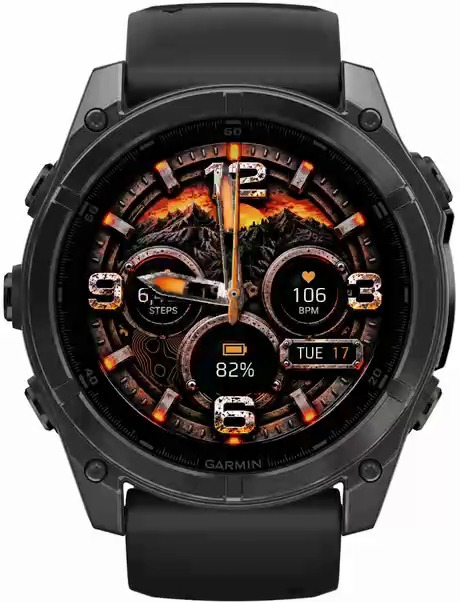
FORGED
The watch your friends will notice before they even say hi. Weathered steel, rust and a warm orange glow.
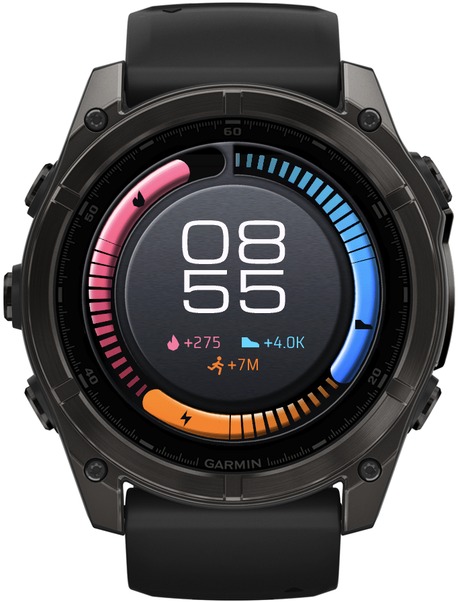
Steady
Your journey isn't a straight line. One ring scored on a rolling 7-day average, so a rest day does not read as a failure.
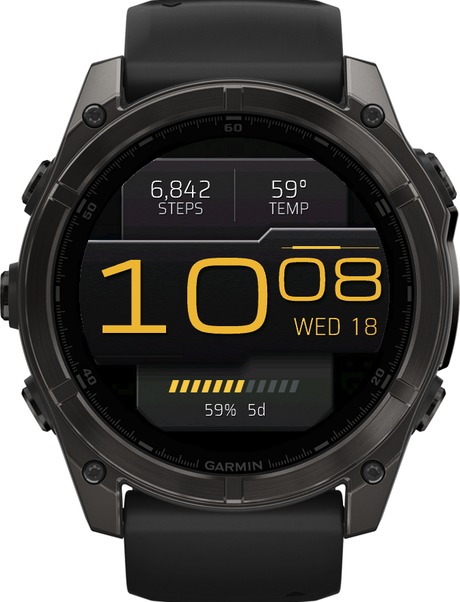
Slab
Your watch, your brand. Huge, clean digital time in colors to match your vibe, your team or your outfit.