
FaceGrabs / Slab / Setup guide
Slab setup guide
Every setting explained, then eight color combos to try.
What is Slab and where are its settings?
Slab is a big, clean digital watch face for round AMOLED and color-screen Garmin watches. Your watch, your brand: you decide how it looks.
Every setting lives in the Garmin Connect IQ phone app. Open Connect IQ, go to My Device or Watch Faces, choose Slab, then Settings. On many watches you can also hold the watch face and choose Customize or Edit to change the same settings on the watch itself. The exact wording of that menu depends on your watch model.
What does each setting do?
The settings are listed in the order they appear in the app.
- Finish
- Steel, Ice, Carbon, Bronze or Glass. Steel has a brushed-metal texture and Glass is frosted.
- Background
- The dial behind the cards. Finish color, Match accent color, or one of Blue, Navy, Teal, Green, Lime, Gold, Orange, Red, Maroon, Pink, Purple or Silver. The finish keeps its texture and takes on the color.
- Accent color
- 29 sets in all: 11 solid colors, 16 two-tone pairs, Rainbow and Khaki + Olive. Solid: Cyan, Orange, Green, Red, Gold, Violet, White, Blue, Pink, Lime, Teal. Pairs: Blue + Orange, Blue + Gold, Blue + Red, Blue + Silver, Sky + Blue, Green + Gold, Green + White, Purple + Gold, Purple + Teal, Red + Gold, Red + Silver, Red + White, Maroon + Gold, Teal + Orange, Orange + White, Black + Gold. Rainbow runs six colors along a bold line above the minutes, a matching line under the hours, the gauge and the seconds ring. The accent colors the date, the gauge and the seconds.
- Accent shade
- Auto, Light or Dark. Changes how light or dark the accent color is.
- Time card
- The big tile behind the time. Match theme, Blue, Navy, Teal, Green, Lime, Gold, Orange, Red, Maroon, Pink, Purple, Silver, Black, White, Olive Drab, Coyote Tan, Ranger Green, Khaki or Camo set. Camo set gives each tile its own military tone.
- Time card text
- Auto, White, Black, or any of Blue, Navy, Teal, Green, Lime, Gold, Orange, Red, Maroon, Pink, Purple, Silver, Rainbow, Khaki or Olive Drab. Rainbow gives each tile text its own color. Auto keeps the dark or white ink the face picks for the card.
- Top left tile, Top right tile, Bottom tile
- Each takes the same choices as the time card: Match theme, Blue, Navy, Teal, Green, Lime, Gold, Orange, Red, Maroon, Pink, Purple, Silver, Black, White, Olive Drab, Coyote Tan, Ranger Green, Khaki or Camo set. Match theme leaves a tile as the finish draws it. Any other choice goes on as a wash, so the finish shows through. White and Black tiles read as true white and black. Dark colors such as Navy, Maroon and the military tones get a stronger wash so they stay rich instead of turning gray.
- Top left text, Top right text, Bottom text
- The same text choices as the time card text: Auto, White, Black or any color.
- Top left and Top right
- Two data fields, 14 choices each: Steps, Temperature, Heart rate, Resting heart rate, Body Battery, Stress, Sunrise / sunset, Altitude, Floors, Calories, Distance, Active minutes, Recovery time, Battery days.
- Bottom bar
- What the bottom gauge shows: Battery, Step goal, Body Battery or Weekly active minutes.
- Seconds
- Off, Digits or Edge ring.
- Time font
- Five fonts: Wide, Sport, Tall, Clean or Light.
- Gauge style
- Three styles for the bottom gauge: Slanted, Solid or Battery.
- Battery colors
- Accent or Green, yellow, red. With Green, yellow, red the battery gauge (and the Body Battery gauge) is colored by level instead of the accent: red at 20% and below, yellow from 21% to 50%, green above 50%.
How do the tile colors share shades?
When two or more tiles use the same color, Slab shades them a shade or two apart so the layers stay easy to tell apart. The two top tiles are the exception: they may match exactly.
What color combos can I try on Slab?
Here are eight color combos to try. Each one is a real capture of the face on a fenix 8 47mm, with its recipe under it. The names match the settings in the app. Settings not listed stay at their defaults.
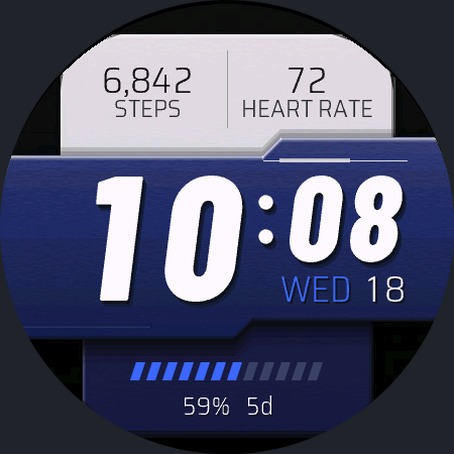
Team colors
Pick your two team colors and give each to a pair of tiles. Here: navy and white. The white tiles get dark text on their own.
- Finish: Carbon
- Accent color: Blue + Silver
- Top left tile and Top right tile: White
- Time card and Bottom tile: Navy
- All four text colors: Auto
- Top right: Heart rate (Top left stays Steps)
- Time font: Sport
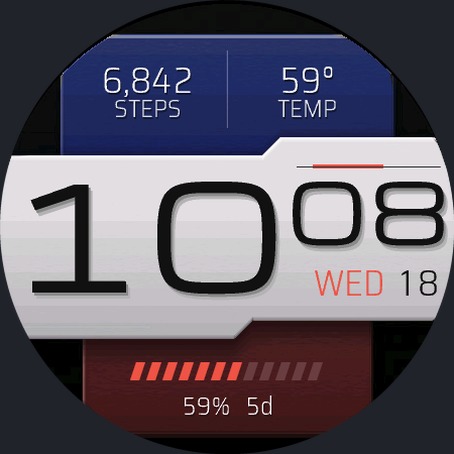
Flag look: blue, white, red
A three-layer flag built from tile colors, not a built-in flag set. Top tiles, time card and bottom tile are the three bands. Swap in any tricolor you like.
- Finish: Carbon
- Accent color: Red
- Top left tile and Top right tile: Navy
- Time card: White
- Bottom tile: Red
- All four text colors: Auto
- Top left and Top right: Steps and Temperature
- Time font: Wide
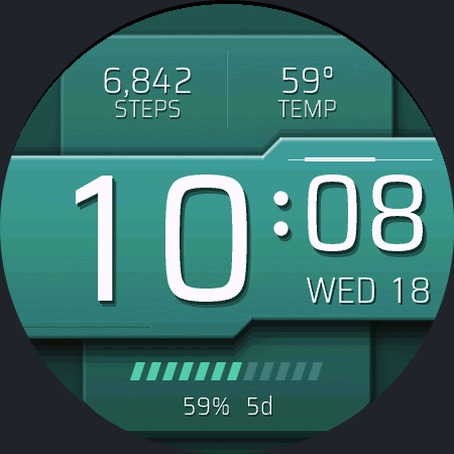
Monochrome tonal
Every tile in one color. The tiles shade themselves so the layers still read clearly.
- Finish: Steel
- Background: Teal
- Accent color: Teal
- All four tiles: Teal
- All four text colors: Auto
- Top left and Top right: Steps and Temperature
- Time font: Clean
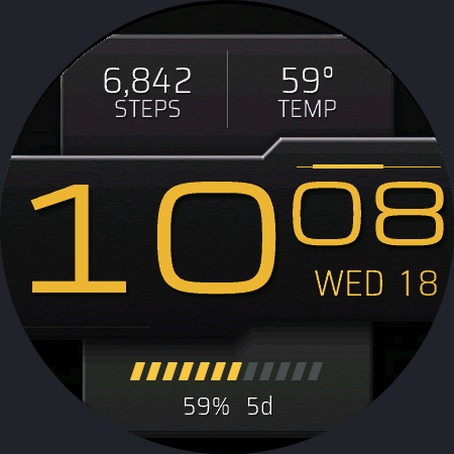
Black and Gold
Dark cards with a gold time. Easy to read and easy to wear with anything.
- Finish: Carbon
- Accent color: Black + Gold
- All four tiles: Black
- Time card text: Gold
- Other three text colors: Auto
- Top left and Top right: Steps and Temperature
- Time font: Wide
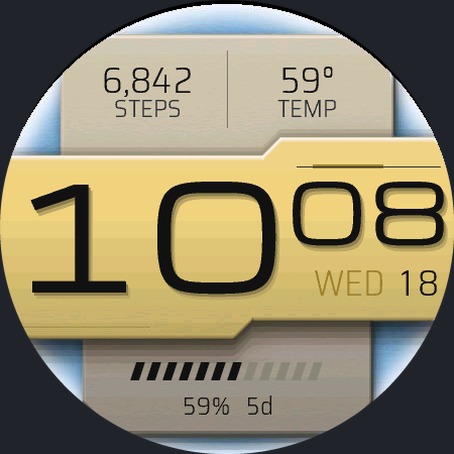
Ice and gold
A light dial with natural khaki tiles and one gold time card. Natural colors read best on a light background.
- Finish: Ice
- Accent color: Gold
- Top left tile, Top right tile and Bottom tile: Khaki
- Time card: Gold
- All four text colors: Auto
- Top left and Top right: Steps and Temperature
- Time font: Wide
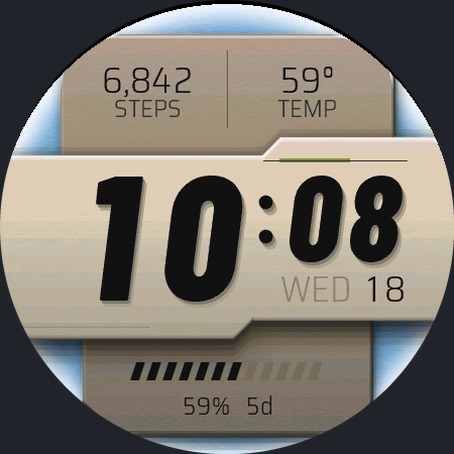
Coyote and khaki on Ice
Earth tones on a light dial. Coyote Tan on three tiles with a Khaki time card.
- Finish: Ice
- Accent color: Khaki + Olive
- Top left tile, Top right tile and Bottom tile: Coyote Tan
- Time card: Khaki
- All four text colors: Auto
- Top left and Top right: Steps and Temperature
- Time font: Sport
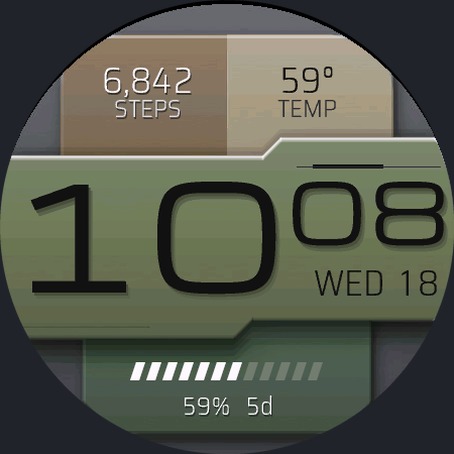
Camo on Silver
The Camo set gives each tile its own military tone: Coyote Tan and Khaki on top, Olive Drab on the time card, Ranger Green on the bottom.
- Finish: Steel
- Background: Silver
- Accent color: Khaki + Olive
- All four tiles: Camo set
- All four text colors: Auto
- Top left and Top right: Steps and Temperature
- Time font: Wide
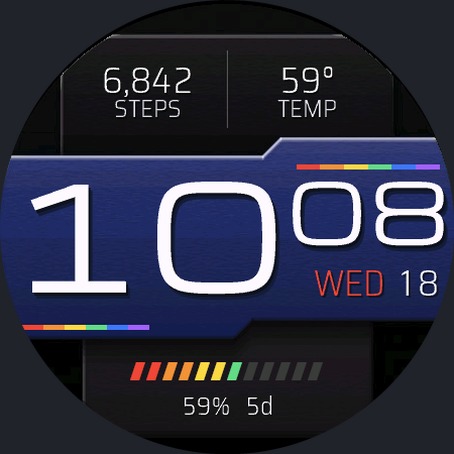
Rainbow
The Rainbow accent runs six colors along a bold line above the minutes, a matching line under the hours and the gauge segments.
- Finish: Carbon
- Accent color: Rainbow
- Top left tile, Top right tile and Bottom tile: Black
- Time card: Navy
- All four text colors: Auto
- Top left and Top right: Steps and Temperature
- Time font: Wide
Common questions
How do I change the colors on Slab?
Open the Garmin Connect IQ app on your phone, go to your watch, open Slab and choose Settings. Pick a finish and an accent color, then give each tile its own color and text color. On many watches you can also hold the watch face and choose the customize or pencil icon to change the same settings on the watch.
Why did my flag accent change?
The country flag accent sets were replaced by tile colors that you mix yourself. Anyone who had picked a flag accent now sees Cyan until they choose a new accent color. Build a flag look from the tile colors: give each layer its own color. The color combos above show how.
How do I reset Slab to its defaults?
Set Finish to Steel, Accent color to Cyan, every tile to Match theme and every text color to Auto. That brings back the standard look. You can also remove the face from your watch and add it again.
Which watches does Slab work on?
Round AMOLED and color-screen Garmin watches including fenix 7, 8 and 9, fenix E, epix 2, many Forerunner models, Venu 3 and 4, vivoactive 5 and 6, Enduro 3 and 4, MARQ 2 and 3, D2 Mach 1 and 2, Approach S70 and Instinct 3 AMOLED. The full list is on the Slab page and the store page.
Can I try Slab before I keep it?
Yes. You can try it for two days from the trial listing on the Connect IQ store.
More from FaceGrabs
FaceGrabs makes watch faces for Garmin. Here are the other three on the store. Each has a listing where you can try it for two days.
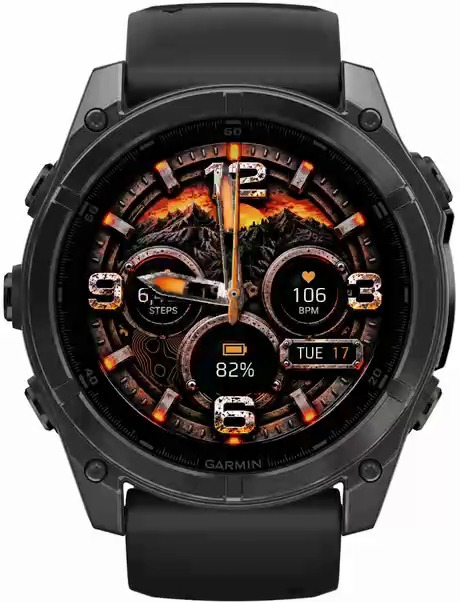
FORGED
The watch your friends will notice before they even say hi. Weathered steel, rust and a warm orange glow.
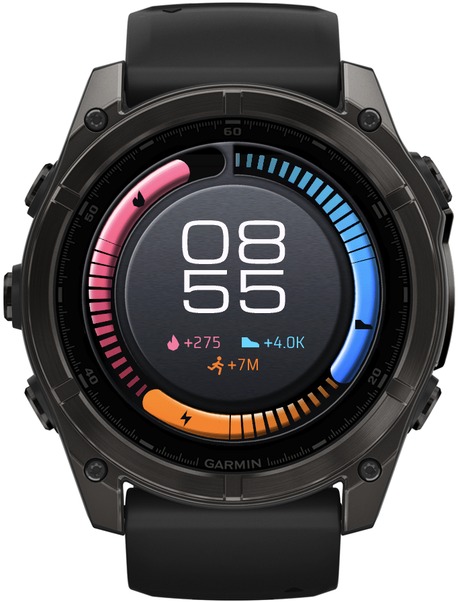
Steady
Your journey isn't a straight line. One ring scored on a rolling 7-day average, so a rest day does not read as a failure.
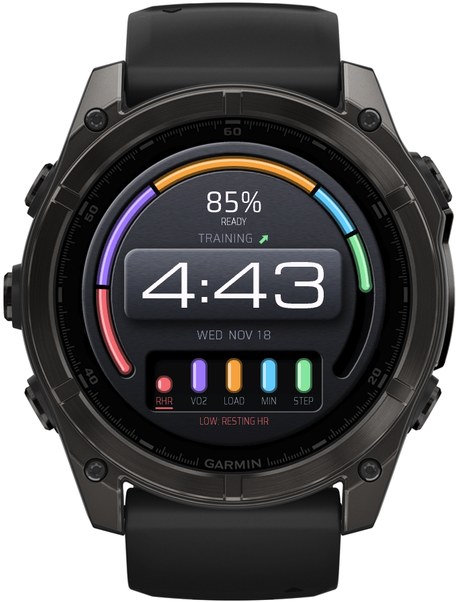
Output
Know when to push. Know when to rest. One readiness score from the five numbers you choose, and what is holding you back.