
FaceGrabs / Steady / Setup guide
Steady setup guide
Install it, read the ring, and set the two things you can change.
What is Steady and how do I install it?
Steady is a Garmin watch face with one ring. The ring is scored on a rolling 7-day average, so you can rest without the guilt.
Steps, active minutes and active calories all fill the same ring. Under the time, three small numbers show what would close the ring from where you are now.
How do I install Steady?
Open the Steady page on the Connect IQ store on your phone, or search for Steady in the Garmin Connect IQ app, and install it. It reaches your watch the next time the watch syncs. If it does not show up as your watch face, pick it from the watch face list on your watch. It is free on the Connect IQ Store.
Where are the Steady settings?
You can change Steady's settings on the watch or in the Garmin Connect IQ phone app. On the watch, hold the watch face, then open its settings. The exact wording of that menu depends on your watch model. In the phone app, open Steady in Connect IQ and choose its settings.
There are two main settings, Level and Active calorie goal, plus a Custom ring target. On the watch, each press of a setting moves it up one step. When it reaches the top it starts again from the bottom.
What does each Steady setting do?
- Active calorie goal
- The active calories that count as a full day. It starts at 700. Each press adds 50, from 200 up to 1000, then it goes back to 200. Active calories are the ones you burn by moving, not the ones you burn at rest.
- Level
- How much of your full goals it takes to close the ring. Beginner closes it at 60%, Intermediate at 80% and Expert at 110%. A new install starts on Intermediate. Custom is for people who changed the old Ring closes at number, and it keeps that number. A lower level makes the ring easier to close. A higher level makes it harder.
- Custom: ring closes at
- Used when Level is Custom. Each press adds 10, from 50% up to 120%, then it goes back to 50%. Changing it by hand on the watch switches Level to Custom.
Where do the steps and active minutes goals come from?
They are your own Garmin goals. Steady reads the step goal from the watch. For active minutes it reads your weekly goal and takes one seventh of it as a day.
What happens to my week when I change a setting?
The whole week is scored again with the new setting, so the ring can move as soon as you change it.
How do I read the Steady face?
What does the ring show?
The ring holds three colored bars, laid end to end. They start at the small notch at 12 o'clock and run clockwise.
- Blue, with a shoe: steps.
- Orange, with a bolt: active minutes.
- Pink, with a flame: active calories.
Each bar is your average for that goal over the last seven days, today included. It is not just today. The ring closes when the three bars average 100%, and Level decides how much of your full goals that takes. A strong area covers a weak one, so you can get there your own way. When the ring closes, the notch fills in and the ring becomes a full circle.
A short bar does not have room for its icon, so the icon only appears once the bar is long enough.
What do the three numbers under the time mean?
They show what it would take to close the ring from where you are now. Each number is the amount (calories, steps or running minutes) that alone would close it. After a quiet week the numbers can be big, because the ring is your whole week, not just today. You do not need to do all three. Pick one, or do a bit of each.
- Flame, on the left: active calories to burn.
- Shoe, on the right: steps to take.
- Runner, at the bottom: minutes of steady running, in orange like the minutes bar. It ends in M, like +25M.
Amounts over 999 are shortened, so 7,500 shows as 7.5K. The numbers shrink as you move through the day.
What happens when the ring closes?
The three numbers are replaced by RING CLOSED. The first time it closes each day, the face plays a short celebration with streaks of light crossing the dial. It plays while the screen is awake.
How do I open the stats view on Steady?
Touch and hold the watch face. The stats view stays up for about eight seconds, then the face comes back. It shows:
- 7 DAY AVG: the ring as a percent.
- Seven bars: one per day, oldest on the left and today on the right in white. The line across them marks a full day. A rest day shows as a short mark next to the days that carry it. On a new install, a day with no history yet shows as an outline.
- TODAY: your steps, active minutes and active calories so far today.
What does the dimmed screen show?
On AMOLED watches the always-on screen shows the time in grey and a thin arc for the ring. It shifts a few pixels each minute to protect the screen.
How does Steady work out the score?
- Seven days, always. The average covers today and the six days before it.
- One big day can close the ring. Today counts in full toward the 7-day average, with no cap, so one big day can close the ring on its own. Once a day is in the past it counts for at most 150%, so one old monster day cannot carry the rest of your week.
- Hard minutes count double. A minute at a vigorous heart rate is worth two moderate minutes.
- Calories mean active calories. Steady takes your total for the day and removes an estimate of what your body burns at rest, based on your Garmin profile.
- It fits your fitness. It uses the VO2 max and resting heart rate in your Garmin profile. The same effort earns more for someone who is less fit.
- A hard day earns more. When your Body Battery is low or your stress is high, what you do counts for more, by up to 30%. A good day never counts for less.
- New installs start fair. A day with no history yet counts as an ordinary day, so you are not punished for having no past. In the week view it shows as an outline.
- Nothing leaves the watch.
Why is Steady not doing what I expect?
Why can I not find Steady settings in the phone app?
They are in the Garmin Connect IQ phone app. Open Connect IQ, choose Steady and open its settings. You can also change them on the watch: hold the watch face, then open its settings.
Why is one of the three numbers missing?
A number is hidden when the watch has no data for that goal yet, such as no step goal.
Why does nothing happen when I touch and hold?
The stats view opens from a touch and hold on the screen, so it needs a touchscreen and an awake screen. Wake the watch first, then touch and hold the face.
Why did the ring close without a celebration?
The celebration plays once a day, and only when the ring closes while the screen is awake.
Why does the face only show the time and "trial ended"?
That is the old trial listing, which is retired. Steady is now free: install the full Steady face from the Connect IQ Store.
Common questions
How do I change the settings on Steady?
Hold the watch face on your watch, then open its settings. Steady has Level and Active calorie goal, plus Custom: ring closes at for a custom target. Each press moves the setting up one step. You can also change them in the Garmin Connect IQ phone app.
What do the three numbers on Steady mean?
They show what would close the ring from where you are now. The flame on the left is active calories, the shoe on the right is steps and the runner at the bottom is minutes of steady running. Each one is the amount that alone would close it.
Does a rest day break my ring on Steady?
No. The ring is a rolling 7-day average, so yesterday still counts and a rest day sits next to the days that carry it.
How do I see my week on Steady?
Touch and hold the watch face. The stats view shows your 7-day average, a bar for each of the last seven days and today's steps, active minutes and active calories.
Does Steady send my data anywhere?
No. Nothing leaves the watch.
Which watches does Steady work on?
Round AMOLED and color-screen Garmin watches including fenix 7, 8 and 9, fenix E, epix 2, many Forerunner models, Venu 3 and 4, vivoactive 5 and 6, Enduro 3 and 4, MARQ 2 and 3, D2 Mach 1 and 2, Approach S70 and Instinct 3 AMOLED. The full list is on the Steady page and the store page.
Does Steady cost anything?
No. Steady is free on the Connect IQ Store.
More from FaceGrabs
FaceGrabs makes watch faces for Garmin. Here are the other three on the store. Output is free on the Connect IQ Store. FORGED and Slab each have a listing where you can try them for two days.
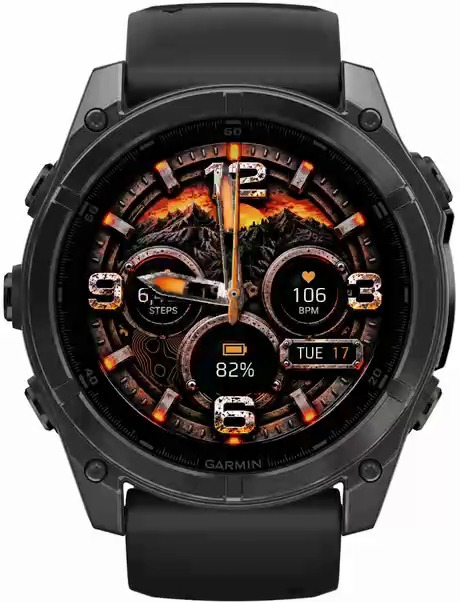
FORGED
The watch your friends will notice before they even say hi. Weathered steel, rust and a warm orange glow.
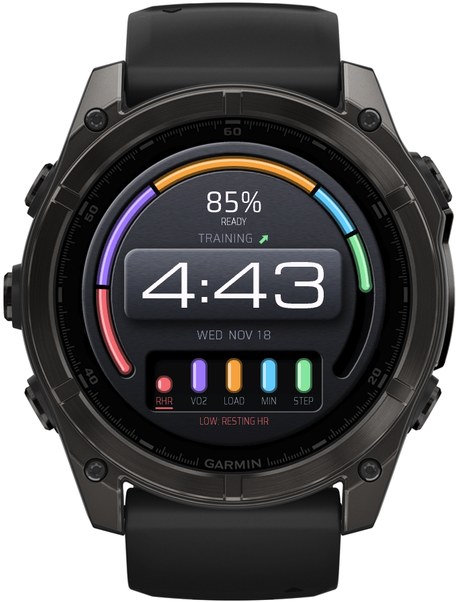
Output
Know when to push. Know when to rest. One readiness score from the five numbers you choose, and what is holding you back.
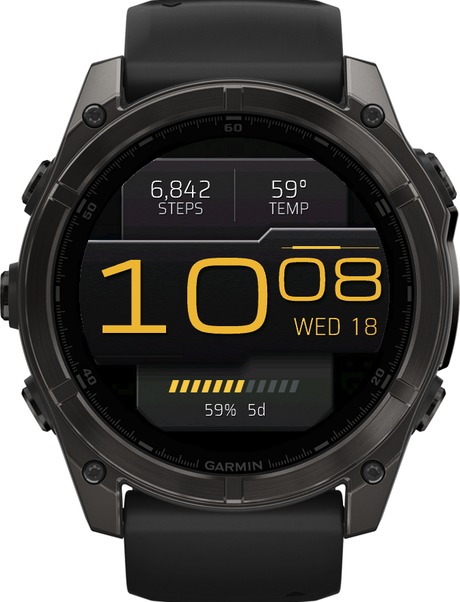
Slab
Your watch, your brand. Huge, clean digital time in colors to match your vibe, your team or your outfit.